Typing Practice Versus a Timed Typing Test: Which Should You Use?
Understand the difference between deliberate untimed typing practice and timed speed tests, and learn how to combine both into an effective typing improvement routine.
Typing Practice
Free interactive typing practice with real-time WPM, accuracy feedback, and keyboard guide.
If you want to play a musical instrument, you do not spend every rehearsal performing on stage under hot lights. You spend hours in a quiet room practicing scales slowly, refining your finger positions, and correcting subtle mistakes.
The same principle applies to touch typing. Yet many aspiring typists make the mistake of doing nothing but taking 60-second speed tests over and over again, wondering why their Words Per Minute (WPM) refuses to budge.
To build lasting keyboard competence, you must understand the distinct roles of training versus testing. In this guide, we compare the UtilityKit Typing Practice tool with the Typing Speed Test and explain how to combine them into an effective improvement cycle.
Comparing the Two Tools
| Dimension | Typing Practice | Typing Speed Test |
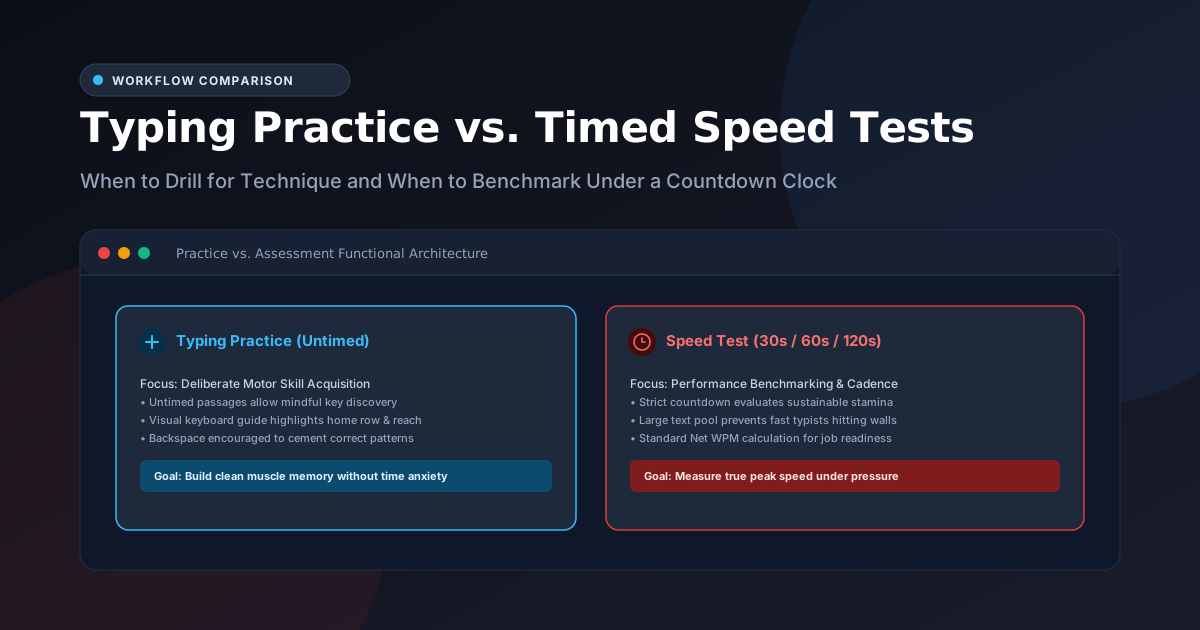
| Primary Goal | Technique, muscle memory, finger reaches | Benchmarking, speed assessment, stamina |
| Timer Model | Counts up (elapsed time; untimed) | Strict countdown clock (30s, 60s, or 120s) |
| Time Pressure | Zero pressure; type at your own pace | Real-time countdown clock |
| Visual Guidance | Includes interactive Virtual Keyboard Guide | Clean, minimalist passage focus |
| Passage Selection | Curated passages by topic and difficulty | Long, continuous prose pool |
| Ideal Mindset | Relaxed, deliberate, 98%+ accuracy focus | Performance cadence, sustained rhythm |
When to Use Typing Practice
The Typing Practice tool is designed for deliberate motor learning:
1. Learning Finger Placement & Home Row
If you are transitioning away from "hunt-and-peck" typing or retraining your hands after years of informal typing habits, you need an environment where you can pause without penalty. The interactive Virtual Keyboard Guide highlights the exact key you need to press, showing you which finger should reach for the character without requiring you to look down at your keyboard.
2. Targeting Weak Characters & Punctuation
Most typists can type common lowercase letters like e, t, a, and o with ease. However, symbols like semicolons (;), quotation marks ("), hyphens (-), numbers, and capital letters often trigger sudden stumbles. Typing Practice provides dedicated Punctuation Focus and Tech Architecture passages specifically designed to exercise your outer finger reaches.
3. Immediate Motor Correction
In Typing Practice, you can use the Backspace key to fix any misstep immediately. This allows your brain to overwrite the faulty neural impulse with the correct motion before moving forward.
When to Use the Typing Speed Test
The Typing Speed Test is designed for objective performance benchmarking:
1. Evaluating True Usable Cadence
Under a strict 60-second countdown clock, your subconscious habits take over. The Speed Test measures how well your muscle memory holds up when time is a factor.
2. Pre-Employment and Academic Certification
Many administrative, data entry, programming, and customer support roles require a verified WPM score on a standardized 60-second test. The UtilityKit Speed Test uses the international standard (Correct Characters ÷ 5) ÷ Elapsed Minutes formula, giving you a legitimate Net WPM benchmark for your resume or portfolio.
3. Testing Sustainable Stamina
Typing fast for 10 seconds is easy; sustaining a high cadence for 60 or 120 seconds requires genuine motor stamina and breath control. The 120-second test option is particularly valuable for discovering whether your wrists or forearms experience fatigue during prolonged typing.
The 4-Step Continuous Improvement Loop
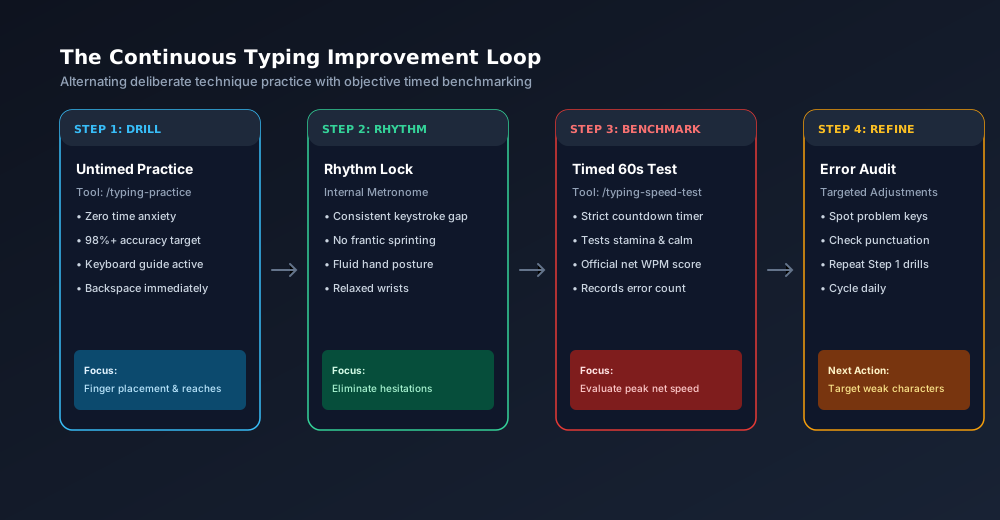
To make consistent progress without burning out, follow this four-phase cycle:
[ Step 1: Practice Drill ] ──> [ Step 2: Rhythm Lock ]
            ↑                                   │
            │                                   ▼
[ Step 4: Error Audit ] <── [ Step 3: Timed Benchmark ]- Step 1: Practice Drill (5–10 minutes): Open Typing Practice. Choose an easy or medium passage. Type with your eyes strictly on the screen, aiming for 98% accuracy.
- Step 2: Rhythm Lock: Notice your rhythm. If you find yourself hesitating on specific key reaches (such as the right pinky reaching for
por-), repeat the passage until the movement feels smooth and effortless. - Step 3: Timed Benchmark (1 minute): Open the Typing Speed Test. Take one standard 60-second test. Maintain the same smooth, calm rhythm you established in practice.
- Step 4: Error Audit: Review your final results. Did you make errors on capital letters? Did you stumble on commas? Note your weak spots, then return to Typing Practice to target those exact keystrokes in your next session.
Summary Advice
- Do not test yourself all day: Taking 20 speed tests in a row leads to cognitive fatigue, sloppy typing, and entrenched bad habits.
- Spend 80% of your time in practice: Untimed drills build the neural pathways that speed tests evaluate.
- Track Net WPM over weeks: Don't stress over a single bad test. Real keyboard fluency develops steadily over weeks of consistent daily practice.
Start today by completing a relaxed passage in Typing Practice, then take a benchmark run on the Typing Speed Test to see where you stand.
Frequently Asked Questions
Quick answers to common questions for users and search assistants
What is the difference between Typing Practice and a Typing Speed Test?
Can I improve my typing speed by only taking timed speed tests?
How often should I take a timed typing test?
Related Utilities Mentioned in This Guide
Browse directoryTyping Practice
Free interactive typing practice with real-time WPM, accuracy feedback, and keyboard guide.
Typing Speed Test
Timed 30s, 60s, and 120s WPM test with countdown clock and instant accuracy scoring.
Text Diff Checker
Compare two text snippets side-by-side and highlight additions, deletions, and changes.
Continue Reading
A Simple Daily Typing Practice Routine and How to Track Progress
Build lasting keyboard speed with a 15-minute daily typing routine. Learn how to structure warm-ups, deliberate drills, and rolling 7-day benchmark tracking.
How Words Per Minute (WPM) is Calculated in a Typing Test
Discover how typing speed is measured using the 5-character standardized word rule, the difference between Gross and Net WPM, and why time normalization matters.