A Simple Daily Typing Practice Routine and How to Track Progress
Build lasting keyboard speed with a 15-minute daily typing routine. Learn how to structure warm-ups, deliberate drills, and rolling 7-day benchmark tracking.
Typing Practice
Free interactive typing practice with real-time WPM, accuracy feedback, and keyboard guide.
Improving your typing speed does not require grueling multi-hour training sessions. In fact, practicing when your forearms are tired or your focus is depleted often reinforces bad motor habits and increases wrist strain.
Motor skills—whether typing, playing piano, or swinging a golf club—are acquired through spaced repetition. Your brain synthesizes and strengthens neural connections during sleep between practice sessions.
Fifteen minutes of calm, deliberate practice every morning will produce dramatically better results than a two-hour marathon once on Sunday.
In this guide, you will learn a structured 15-Minute Daily Typing Protocol, how to accurately track your progress without getting discouraged by natural daily variance, and how to push through speed plateaus using the UtilityKit Typing Practice and Typing Speed Test tools.
The 15-Minute Daily Protocol
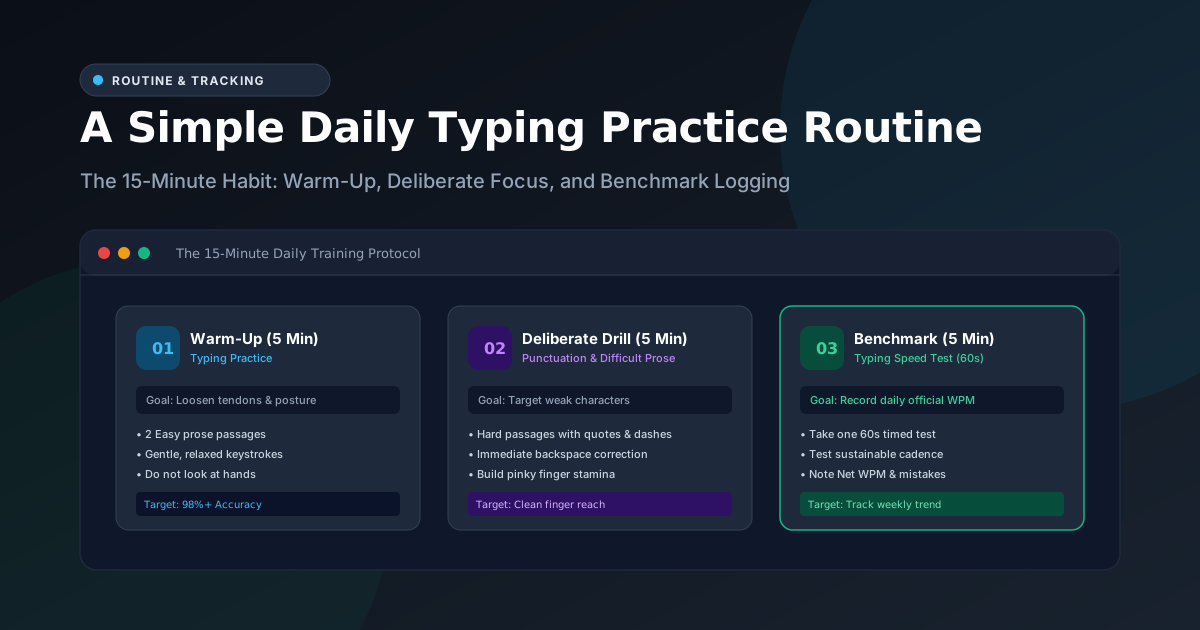
Divide your daily training into three structured 5-minute blocks:
Phase 1: Warm-Up & Posture Check (Minutes 0–5)
- Tool: Typing Practice
- Passage Selection: Choose an Easy or General Prose passage (e.g., "Clear Thinking & Focus").
- Focus:
- Sit with your back supported, elbows at a relaxed 90-degree angle, and wrists hovering naturally above the desk (never resting heavily on hard wrist rests).
- Type at a gentle, comfortable pace. Do not rush.
- Ensure your index fingers are anchored on
FandJ. - Goal: Warm up cold tendons, establish smooth breathing, and achieve 98%+ accuracy.
Phase 2: Deliberate Drill & Weak Key Focus (Minutes 5–10)
- Tool: Typing Practice
- Passage Selection: Choose a Hard or Punctuation Focus passage (e.g., "Punctuation & Flow" or "Building Resilient Systems").
- Focus:
- Pay attention to characters that cause you to hesitate (such as semicolons, capital letters requiring the opposite Shift key, or number reaches).
- Keep the Virtual Keyboard Guide visible to confirm you are using the correct finger for each reach.
- If you hit an error, use a single crisp Backspace tap and continue forward with rhythmic composure.
Phase 3: The Daily Benchmark (Minutes 10–15)
- Tool: Typing Speed Test
- Duration: Select the standard 60-Second Test.
- Focus:
- Take one official test.
- Bring the relaxed posture and high-accuracy rhythm you established during practice into the test.
- Do not panic as the countdown timer ticks down; keep your eyes locked on the upcoming words.
- When the test completes, write down your Net WPM and Accuracy %.
How to Track Progress Accurately
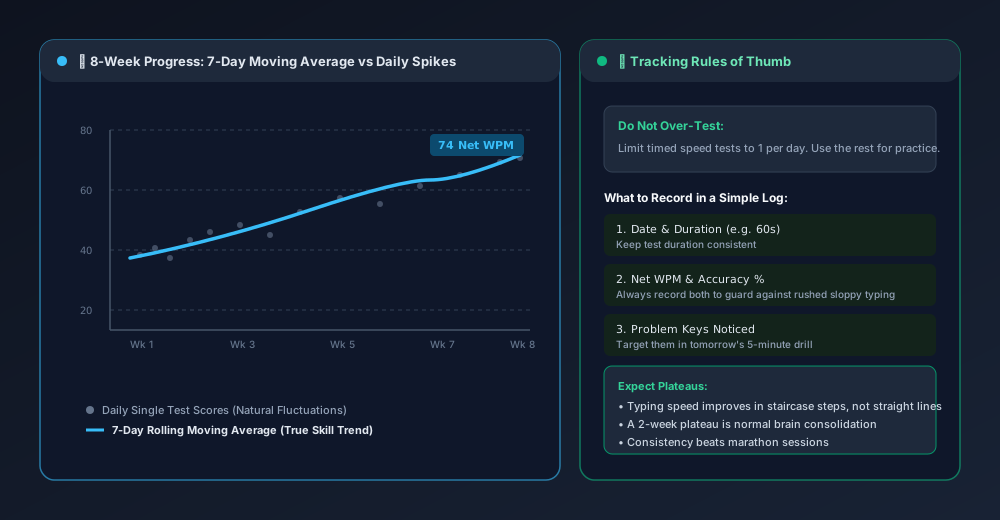
The biggest mistake aspiring typists make is judging their skill based on a single test score.
If you score 62 WPM on Monday and 56 WPM on Tuesday, it does not mean your typing skill decreased overnight. You might simply be slightly dehydrated, tired, or typing on a cold keyboard.
Track the 7-Day Moving Average
To measure real progress, record your daily 60-second score in a simple note or spreadsheet:
| Date | Duration | Net WPM | Accuracy | Errors | 7-Day Average |
| Oct 17 | 60s | 54 WPM | 98.2% | 2 | 54.0 WPM |
| Oct 18 | 60s | 51 WPM | 97.4% | 3 | 52.5 WPM |
| Oct 19 | 60s | 58 WPM | 98.9% | 1 | 54.3 WPM |
| Oct 20 | 60s | 56 WPM | 98.0% | 2 | 54.8 WPM |
| Oct 21 | 60s | 53 WPM | 96.8% | 4 | 54.4 WPM |
| Oct 22 | 60s | 61 WPM | 99.1% | 1 | 55.5 WPM |
| Oct 23 | 60s | 59 WPM | 98.5% | 2 | 56.0 WPM |
Notice how day-to-day scores bounce up and down between 51 and 61 WPM, but the 7-day average climbs steadily upward from 54.0 to 56.0 WPM. The moving average smooths out temporary noise and reveals your genuine skill trajectory.
How to Break Through Speed Plateaus
Almost every typist experiences a plateau around 45–50 WPM, and another around 70–75 WPM. During a plateau, your WPM may hover in place for two or three consecutive weeks despite daily practice.
This is completely normal. Motor learning progresses in a staircase pattern, not a linear diagonal line. When your speed plateaus:
- Stop Taking Timed Tests for 5 Days: Step away from the countdown clock entirely. Timed pressure induces anxiety when you feel stuck.
- Switch to 100% Practice Drills: Spend all 15 minutes in Typing Practice.
- Audit Your Finger Habits: Are you sneaking glances down at your hands? Are you using the wrong Shift key for capital letters? Are you floating your right hand when hitting Backspace? Tighten up your physical discipline.
- Return to Testing: When you take the 60-second Speed Test again the following week, your brain will have completed its background neural consolidation, often resulting in an immediate jump of 5 to 8 WPM.
Final Recommendation
Consistency is your superpower. Bookmark the Typing Practice tool and make the 15-minute protocol your first digital habit each morning before opening your email or social media. Within a few weeks, your keyboard will become an effortless extension of your thoughts.
Frequently Asked Questions
Quick answers to common questions for users and search assistants
How long should I practice typing each day to see real improvement?
Why does my typing speed fluctuate from day to day?
What should I do when I hit a typing speed plateau?
Related Utilities Mentioned in This Guide
Browse directoryTyping Practice
Free interactive typing practice with real-time WPM, accuracy feedback, and keyboard guide.
Typing Speed Test
Timed 30s, 60s, and 120s WPM test with countdown clock and instant accuracy scoring.
Word and Character Counter
Count words, characters, sentences, paragraphs, reading time, and keyword frequency.
Continue Reading
How Words Per Minute (WPM) is Calculated in a Typing Test
Discover how typing speed is measured using the 5-character standardized word rule, the difference between Gross and Net WPM, and why time normalization matters.
Typing Accuracy Versus Speed: What to Focus on During Practice
Why prioritizing typing accuracy over raw speed eliminates the costly backspace penalty, consolidates muscle memory, and naturally unlocks sustainable typing velocity.