Typing Accuracy Versus Speed: What to Focus on During Practice
Why prioritizing typing accuracy over raw speed eliminates the costly backspace penalty, consolidates muscle memory, and naturally unlocks sustainable typing velocity.
Typing Practice
Free interactive typing practice with real-time WPM, accuracy feedback, and keyboard guide.
When people decide to improve their typing skills, their first instinct is almost always to type faster. They press keys furiously, rush through sentences, and race against the clock.
Yet within days, they inevitably hit a stubborn ceiling—frequently hovering around 40 to 50 Words Per Minute (WPM)—accompanied by frequent stumbles, hand fatigue, and mounting frustration.
The underlying problem is a misunderstanding of how motor skill learning works. In keyboard mastery, speed is an outcome, not a practice strategy.
In this article, you will discover the compounding penalty of typing errors, why motor memory requires high accuracy, and how slowing down slightly in Typing Practice unlocks effortless long-term speed.
The Hidden Cost of a Single Mistake
Most typists underestimate how much a single typing mistake actually costs. They assume that if they can type 5 characters per second, hitting an incorrect letter only sets them back by 0.2 seconds.
In reality, digital typing diagnostics reveal that a single mistake triggers a disruptive four-phase chain reaction:
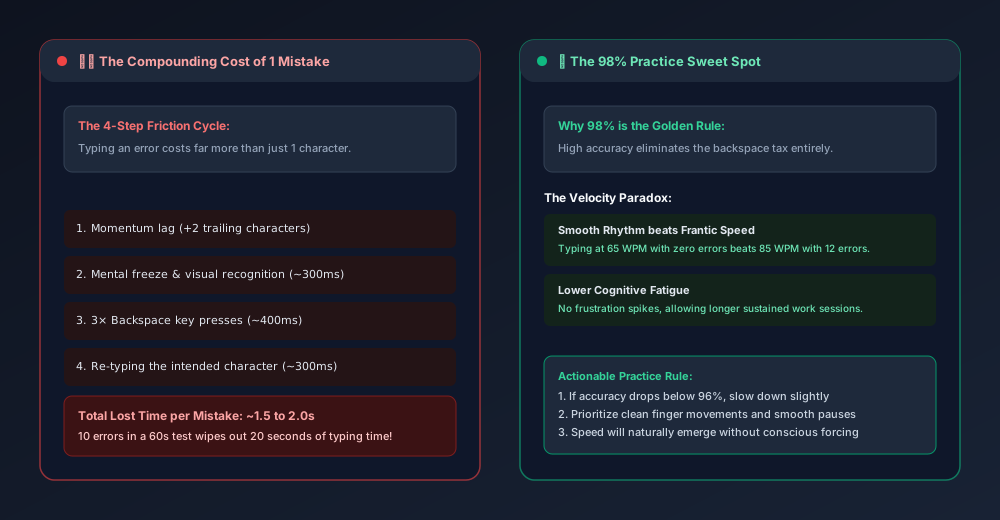
- Momentum Lag: Because your fingers move faster than your conscious feedback loop, you typically type two to three additional characters after the mistake occurred before your eyes or brain catch the error.
- Cognitive Freeze (~300ms): Your brain registers the visual red error flag or mismatch, causing an involuntary micro-pause in motor rhythm.
- Backspace Strikes (~400ms): You must reach with your right pinky to the Backspace key and press it three to four times to erase both the mistake and the trailing characters.
- Re-orientation & Re-entry (~400ms): Your hands re-align with home row, and you re-type the intended character.
The Math: 1.5 Seconds Lost Per Error
Each error burns 1.5 to 2.0 seconds of pure productive time.
If you make 10 mistakes during a 60-second test on the Typing Speed Test, you will spend 15 to 20 seconds—nearly a third of your entire test—simply recovering from errors!
Even if your raw gross typing speed is 85 WPM, losing 20 seconds to backspacing will drag your actual Net WPM down into the 50s.
The Velocity Paradox: Smooth Rhythm Beats Frantic Bursts
Watch an expert pianist or professional typist: they never look frantic. Their hands barely seem to move, yet characters flow continuously across the screen.
This efficiency stems from cadence consistency. Consider two typists:
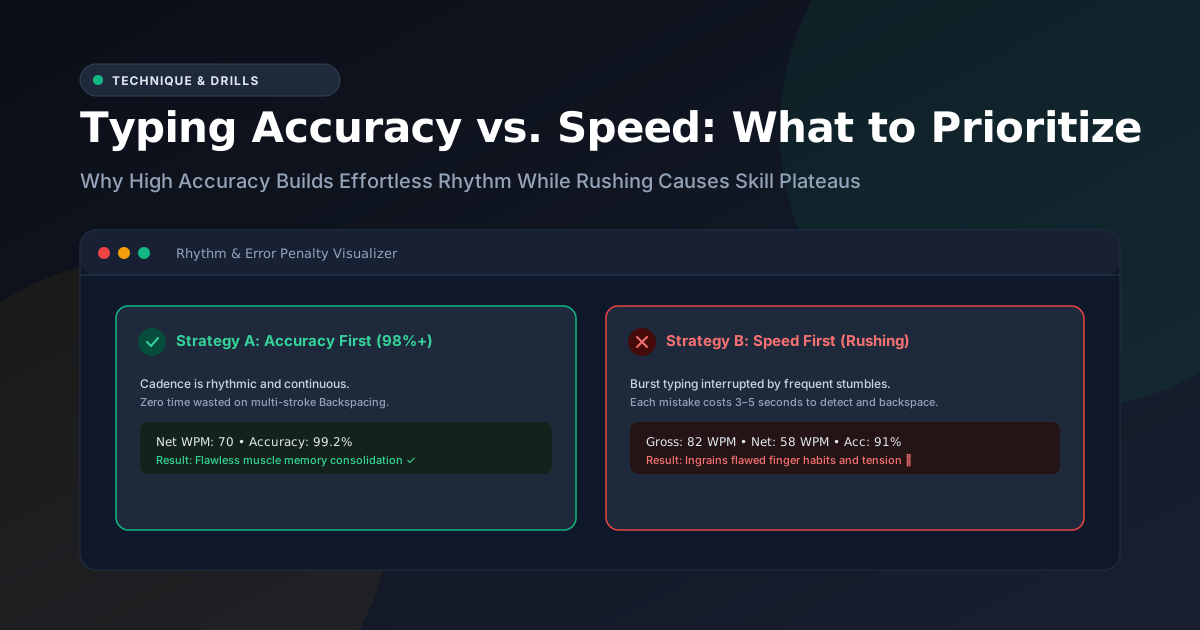
- Typist A (The Sprinter): Types in sudden 90 WPM bursts, then stumbles on a comma, pauses for two seconds, hits backspace furiously, sprints again, and miskeys another word.
- Final Result: 55 Net WPM, 91% Accuracy.
- Typist B (The Metronome): Maintains a calm, steady, unhurried cadence of 68 WPM with zero errors and no backspacing.
- Final Result: 68 Net WPM, 99.5% Accuracy.
Typist B finishes with a significantly higher score, lower physical fatigue, and zero mental stress.
How Muscle Memory Actually Consolidates
Every time you type a word like practice, your nervous system fires a sequence of neural impulses coordinating your left and right fingers across home row.
- If you type
practicecleanly five times in a row, your brain strengthens that exact motor pathway. - If you type
praxtice, backspace, and then typepraactice, your brain encodes three conflicting pathways.
Rushing through practice with an accuracy rate below 95% literally trains your fingers to be inconsistent. It reinforces bad reach habits and teaches your nervous system to hesitate.
[!IMPORTANT] The golden benchmark for typing drills is 98% accuracy. If your session accuracy drops below 96%, you are typing too fast for your current muscle memory. Slow down until you can complete a paragraph cleanly.
Actionable Drills to Build Accuracy First
To break through a speed plateau, use the untimed Typing Practice tool with these three deliberate rules:
1. The Metronome Rule
Say the words or syllables in your head at a steady, rhythmic pace. Do not speed up on easy words (like the or and) and slam on the brakes for difficult words. Strive to make the time between every single keystroke identical.
2. The Clean Backspace Rule
When you do make an error, do not panic or hammer the Backspace key repeatedly. Tap it once with deliberate control, verify your cursor position, and press the correct key.
3. Never Look Down
Looking down at your hands breaks spatial muscle memory. Use the on-screen Virtual Keyboard Guide in Typing Practice to see which key to press and which finger to use, keeping your eyes anchored to the screen.
Summary Checklist
| Focus Area | Speed-First Approach | Accuracy-First Approach (Recommended) |
| Pacing | Frantic bursts followed by stops | Steady, metronomic rhythm |
| Accuracy Target | 90% – 93% (High error count) | 97% – 99% (Near-zero backspacing) |
| Error Recovery | Frantic multi-backspacing | Single calm correction or zero errors |
| Skill Plateau | Stagnates at 45–55 WPM | Progresses smoothly to 70+ WPM |
| Session Fatigue | High wrist and mental tension | Relaxed, sustainable flow state |
Ready to build true typing confidence? Open Typing Practice, select an easy or medium prose passage, and aim for a flawless 98%+ accuracy run today.
Frequently Asked Questions
Quick answers to common questions for users and search assistants
Should I focus on speed or accuracy when learning to type?
Why do typing mistakes slow me down so much?
How does high accuracy improve final net WPM?
Related Utilities Mentioned in This Guide
Browse directoryTyping Practice
Free interactive typing practice with real-time WPM, accuracy feedback, and keyboard guide.
Typing Speed Test
Timed 30s, 60s, and 120s WPM test with countdown clock and instant accuracy scoring.
Word and Character Counter
Count words, characters, sentences, paragraphs, reading time, and keyword frequency.
Continue Reading
How Words Per Minute (WPM) is Calculated in a Typing Test
Discover how typing speed is measured using the 5-character standardized word rule, the difference between Gross and Net WPM, and why time normalization matters.
How to Use Punctuation and Correction Practice to Improve Typing
Master pinky finger reaches, opposite-hand Shift key coordination, and rapid Backspace error recovery to unlock real-world keyboard fluency.