How Words Per Minute (WPM) is Calculated in a Typing Test
Discover how typing speed is measured using the 5-character standardized word rule, the difference between Gross and Net WPM, and why time normalization matters.
Typing Speed Test
Timed 30s, 60s, and 120s WPM test with countdown clock and instant accuracy scoring.
When you complete an online typing assessment—such as the 60-second challenge on the UtilityKit Typing Speed Test—you receive a definitive speed score: Words Per Minute (WPM).
For many typists, the number raises natural questions:
- What if the test passage was filled with unusually long, technical words?
- Do spaces, commas, and capital letters count as words?
- How do typing errors affect the final score?
In this article, you will learn the exact mathematics behind WPM scoring, why the typing industry standardized on the 5-character rule, and how the formulas in UtilityKit produce accurate, objective measurements.
The Problem with Counting Literal Words
If a typing test counted words simply by looking for spaces between letters, scores would fluctuate wildly depending on vocabulary difficulty:
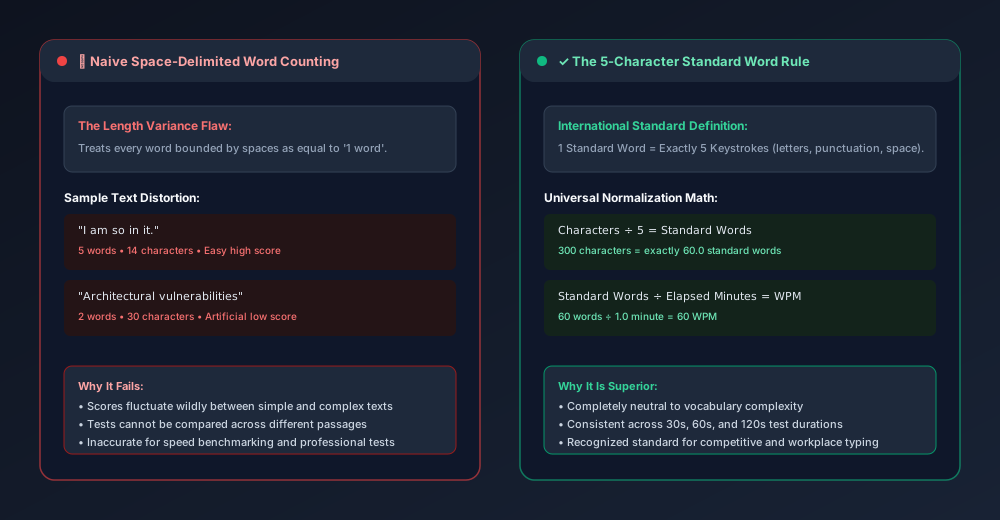
Consider two short sentences:
I am so in it.(5 words, 14 characters)Architectural vulnerabilities.(2 words, 30 characters)
A typist who types sentence #1 in 6 seconds would record an astonishing 50 WPM under literal word counting. The same typist taking 6 seconds to type sentence #2 would record just 20 WPM—despite typing more than twice as many physical characters!
To eliminate this vocabulary bias, standardized testing protocols (established by early typewriter manufacturers and standardized across educational testing bodies) defined one standard typing word as exactly 5 keystrokes.
The Standard WPM Formula
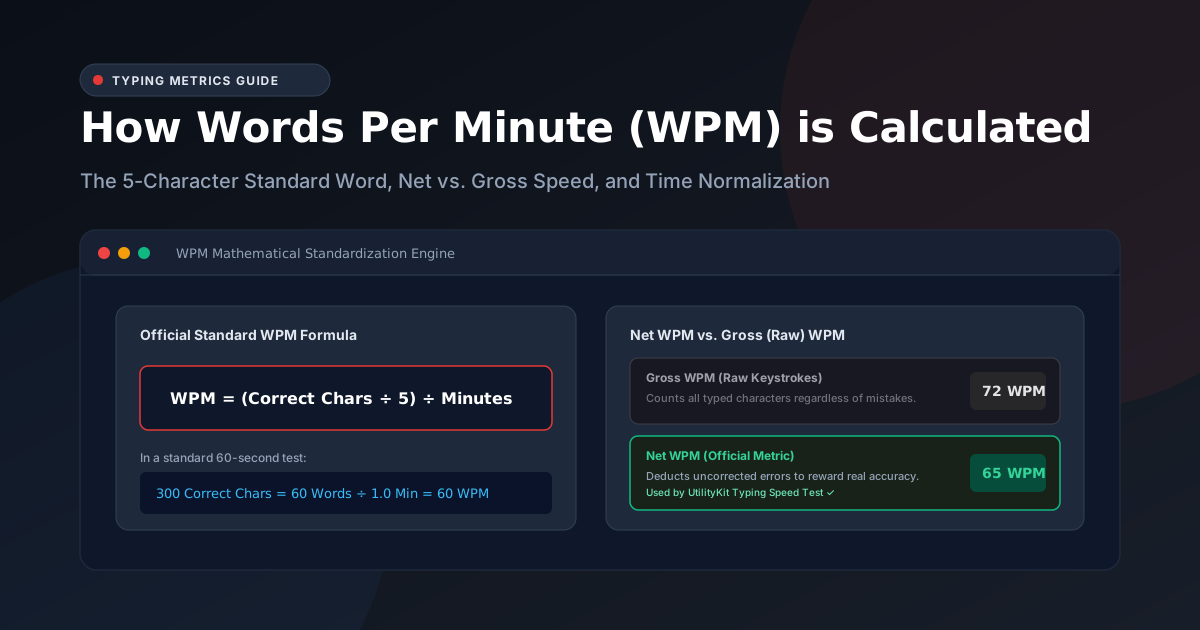
Under the 5-character standardization rule, every letter, number, punctuation mark, and space counts as a keystroke. The formula used across UtilityKit is:
$$\text{Standard Words} = \frac{\text{Correctly Typed Characters}}{5}$$
$$\text{Net WPM} = \frac{\text{Standard Words}}{\text{Elapsed Minutes}} = \frac{\text{Correctly Typed Characters} \times 12}{\text{Elapsed Seconds}}$$
Example 1: A Standard 60-Second Test
- Duration: 60 seconds (1.0 minute)
- Correct Characters Typed: 350 characters
- Standard Words: $350 \div 5 = 70\text{ words}$
- Net WPM: $70 \div 1.0 = \mathbf{70\text{ WPM}}$
Example 2: A 30-Second Sprint
- Duration: 30 seconds (0.5 minutes)
- Correct Characters Typed: 200 characters
- Standard Words: $200 \div 5 = 40\text{ words}$
- Net WPM: $40 \div 0.5 = \mathbf{80\text{ WPM}}$
Example 3: Handling Zero Elapsed Time
In code, elapsed time must handle edge cases gracefully:
export function calculateWPM(correctChars: number, elapsedSeconds: number): number {
  if (elapsedSeconds <= 0 || correctChars <= 0) {
    return 0;
  }
  const minutes = elapsedSeconds / 60;
  const words = correctChars / 5;
  return Math.max(0, Math.round(words / minutes));
}
If a user has just clicked into the box but has not started typing, the engine safely returns 0 rather than NaN or Infinity.
Gross WPM vs. Net WPM
When reviewing results on the Typing Speed Test, you will see both Net Speed and Raw Keystrokes (Gross WPM):
Gross WPM (Raw Speed)
Gross WPM measures the raw physical speed at which your fingers hit keys, completely ignoring mistakes:
$$\text{Gross WPM} = \frac{\text{Total Typed Characters} \div 5}{\text{Elapsed Minutes}}$$
Gross WPM represents your theoretical motor velocity.
Net WPM (Productive Speed)
In the real world, mistyped words are useless until corrected. Net WPM strictly considers accurately typed characters:
$$\text{Net WPM} = \frac{\text{Correct Characters} \div 5}{\text{Elapsed Minutes}}$$
If a typist types 400 characters in 60 seconds (Gross WPM = 80), but makes 10 uncorrected errors leaving only 350 correct characters, their Net WPM drops to 70.
How Accuracy Percentage is Scored
Accuracy measures your precision across all keystrokes attempted:
$$\text{Accuracy \%} = \left( \frac{\text{Correct Characters}}{\text{Total Keystrokes}} \right) \times 100$$
If you type a 200-character paragraph and press the Backspace key to fix 8 mistakes along the way, your total attempted keystrokes will be $208$.
- $\text{Accuracy} = (200 \div 208) \times 100 = \mathbf{96.2\%}$.
Because backspacing increases your total attempts without increasing correct characters, frequent mistakes naturally lower your accuracy percentage.
Practical Speed Benchmarks
While individual typing speeds vary depending on profession and keyboard familiarity, standardized WPM brackets provide a useful frame of reference:
| WPM Range | Proficiency Tier | Real-World Context |
| 20 – 35 WPM | Hunt & Peck / Novice | Common among occasional computer users who look at the keyboard. |
| 36 – 50 WPM | Average Typist | Standard everyday office worker speed; sufficient for routine email. |
| 51 – 70 WPM | Fluent Touch Typist | Strong touch typing; muscle memory handles all letter keys without conscious glances. |
| 71 – 90 WPM | High Performance | Typical speed for programmers, legal transcriptionists, and writers. |
| 90+ WPM | Expert / Competitive | Peak elite cadence; requires high-accuracy motor consistency and rapid finger return. |
Testing Your Own WPM
Now that you understand the mathematical principles behind WPM scoring, benchmark your current speed on the UtilityKit Typing Speed Test. Choose between 30, 60, or 120 seconds, and observe your live Net WPM and accuracy in real time.
Frequently Asked Questions
Quick answers to common questions for users and search assistants
What is the official formula for calculating Words Per Minute (WPM)?
Why does a typing test count 5 characters as a word instead of actual words?
What is the difference between Gross WPM and Net WPM?
Related Utilities Mentioned in This Guide
Browse directoryTyping Speed Test
Timed 30s, 60s, and 120s WPM test with countdown clock and instant accuracy scoring.
Typing Practice
Free interactive typing practice with real-time WPM, accuracy feedback, and keyboard guide.
Word and Character Counter
Count words, characters, sentences, paragraphs, reading time, and keyword frequency.
Continue Reading
A Simple Daily Typing Practice Routine and How to Track Progress
Build lasting keyboard speed with a 15-minute daily typing routine. Learn how to structure warm-ups, deliberate drills, and rolling 7-day benchmark tracking.
Typing Accuracy Versus Speed: What to Focus on During Practice
Why prioritizing typing accuracy over raw speed eliminates the costly backspace penalty, consolidates muscle memory, and naturally unlocks sustainable typing velocity.