Pretty-Printing vs. Minifying JSON: When and Why to Use Each
Understand the technical tradeoffs between pretty-printing with 2 or 4 spaces and compact single-line minification for API payloads, Git diffs, and database storage.
JSON Tools
Format, validate, view in a collapsible interactive tree, and visually edit JSON with draft safety.
When building modern web applications, distributed microservices, and mobile backends, you constantly handle JSON in two contrasting states:
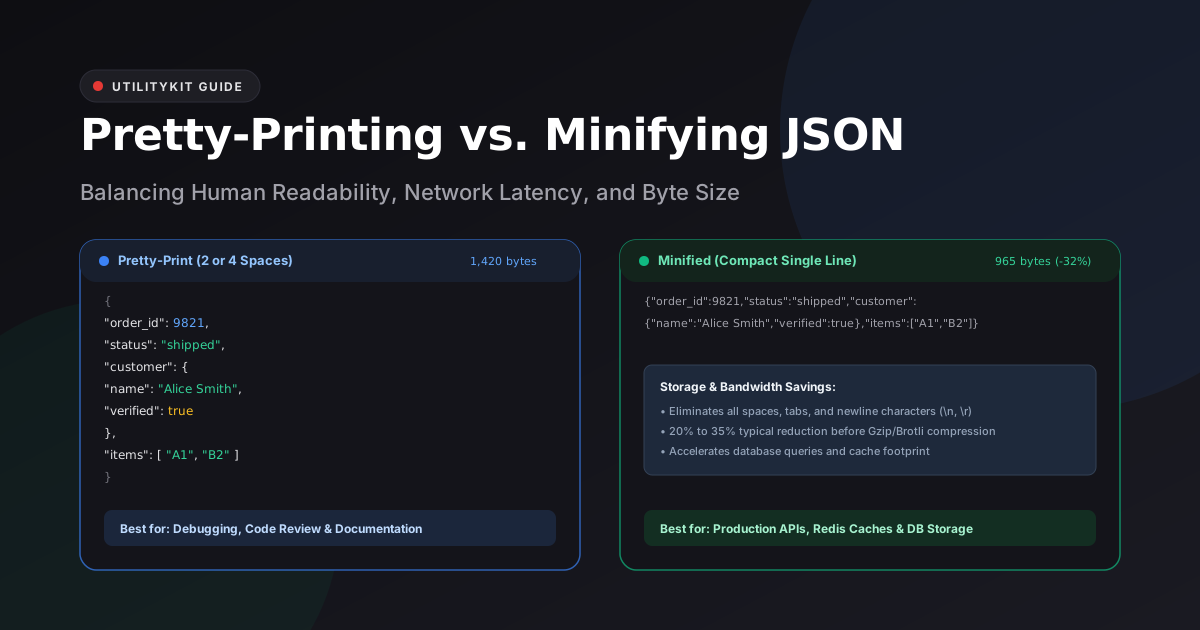
- Pretty-Printed JSON: Beautifully indented with clean newlines and nested spacing.
- Minified JSON: Condensed onto a single continuous line with all unnecessary whitespace stripped.
While both representations contain the exact same data, choosing the wrong format at the wrong stage of your pipeline harms developer velocity or degrades network performance.
In this guide, you will learn the exact mechanics of JSON formatting, benchmark size differences, compare 2-space vs. 4-space indentation, and follow a clear decision framework for production systems.
The Core Difference: Formatted vs. Compact
Consider this product inventory record:
Pretty-Printed (2 Spaces) — 214 Bytes
{
  "sku": "KB-MECH-01",
  "name": "Mechanical Keyboard",
  "in_stock": true,
  "pricing": {
    "retail": 129.99,
    "wholesale": 84.50
  },
  "tags": [
    "gaming",
    "usb-c",
    "rgb"
  ]
}
Minified (Single Line) — 144 Bytes (-33% Reduction)
{"sku":"KB-MECH-01","name":"Mechanical Keyboard","in_stock":true,"pricing":{"retail":129.99,"wholesale":84.5},"tags":["gaming","usb-c","rgb"]}In this small 5-key example, removing newlines and spaces shaved off 70 bytes—a 33% reduction in payload weight. Across a paginated API delivering 500 records per request, that difference amounts to hundreds of kilobytes saved per user interaction.
When to Pretty-Print
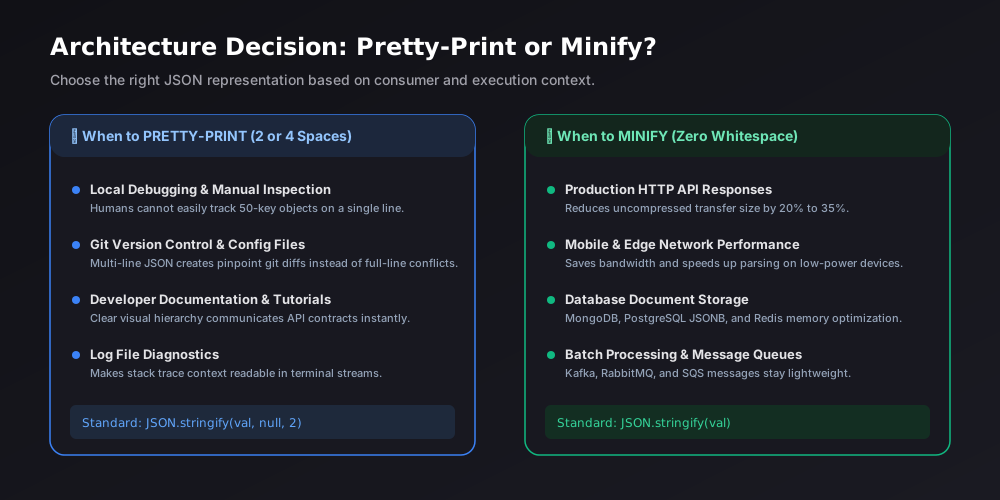
Pretty-printing adds whitespace (spaces or tabs) and line breaks to visualize the tree hierarchy of objects and arrays.
1. Local Debugging and API Inspection
When inspecting an API response in your browser devtools, terminal, or Postman, human eyes cannot scan 200 properties on a single unbroken line. Pretty-printing makes null values, boolean flags, and nested arrays immediately obvious.
2. Git Version Control & Pull Requests
Version control systems like Git work on a line-by-line basis. If you commit a minified configuration file (like a tsconfig.json or package.json), modifying one single setting marks the entire 500-character line as changed:
- ❌ Minified Diff: One line replaced with another giant line. Reviewers cannot spot what changed.
- ✅ Pretty-Printed Diff: Exact 1-line addition or modification, making code review effortless.
3. Developer Documentation and Tutorials
When documenting API schemas, pretty-printed examples communicate the structure, available fields, and data types far better than minified blocks.
When to Minify
Minification strips all whitespace that is not part of a string literal.
1. Production HTTP API Endpoints
When an endpoint responds to client apps, every byte sent over cellular data counts. While HTTP compression (like Gzip and Brotli) reduces text size substantially, compressing a minified document is faster and yields a smaller final archive than compressing an unminified one.
2. Database and Cache Storage
Storing millions of JSON documents inside PostgreSQL jsonb columns, MongoDB collections, or Redis caches? Storing raw pretty-printed text wastes disk blocks and RAM on redundant newline and space characters.
3. Webhooks & High-Throughput Event Streams
Kafka topics, AWS SQS queues, and Redis Pub/Sub channels process millions of messages per minute. Minifying payloads minimizes memory allocation and garbage collection pauses across consumer clusters.
2 Spaces vs. 4 Spaces: Which Should You Use?
When formatting JSON, the indentation width is a common debate:
| Indentation | Key Benefits | Ideal Use Case |
| 2 Spaces | Fits deeply nested structures on laptop displays without horizontal scrolling. | Web APIs, Node.js, Frontend, Cloud configs |
| 4 Spaces | High visual contrast between parent and child elements. | Python/Java backends, Education |
| Tab (`\t`) | Compact single-byte character; customizable display width in user editors. | Accessibility-first teams |
Most modern developer tooling (including Prettier, ESLint, and Google's style guide) standardizes on 2 spaces as the optimal compromise between readability and compact horizontal width.
How to Switch Instantly with UtilityKit
You can format or minify JSON files in milliseconds without sending any data over the internet:
- Navigate to UtilityKit's browser-only JSON Tools.
- Paste your raw payload or drop a file into the editor.
- In the toolbar, click 2 Spaces, 4 Spaces, or Minify.
- The output updates instantly with exact byte size and key count metrics.
- Click Copy Result or Download to save your formatted file.
Frequently Asked Questions
Quick answers to common questions for users and search assistants
How much bandwidth does minifying JSON actually save?
Should I use 2 spaces or 4 spaces when pretty-printing?
Does minification affect the actual data stored in JSON?
Related Utilities Mentioned in This Guide
Browse directoryJSON Tools
Format, validate, view in a collapsible interactive tree, and visually edit JSON with draft safety.
Text Diff Checker
Compare two text snippets side-by-side and highlight additions, deletions, and changes.
Text Cleaner
Remove rogue line breaks, extra spaces, odd characters, and formatting clutter.
Continue Reading
Escaping Quotes, Backslashes, and Unicode in JSON Strings
Master JSON string escape sequences under RFC 8259: handle Windows file paths, embedded quotation marks, control characters, and Unicode surrogate pairs without syntax errors.
How to Edit a JSON Configuration File Without Breaking Its Structure
Discover how to modify JSON configs, package.json, and app settings safely using draft validation, inline key renaming, and type-safe visual tree editing.