Sort Numbered File Lists Free: Get the Order 1, 2, 10
Sort filenames and numbered labels free in your browser. Choose natural order, add numbering, and copy the result without an account or file uploads.
Sort and Number Lines
Sort lines alphabetically, numerically, or naturally, and add custom line numbering.
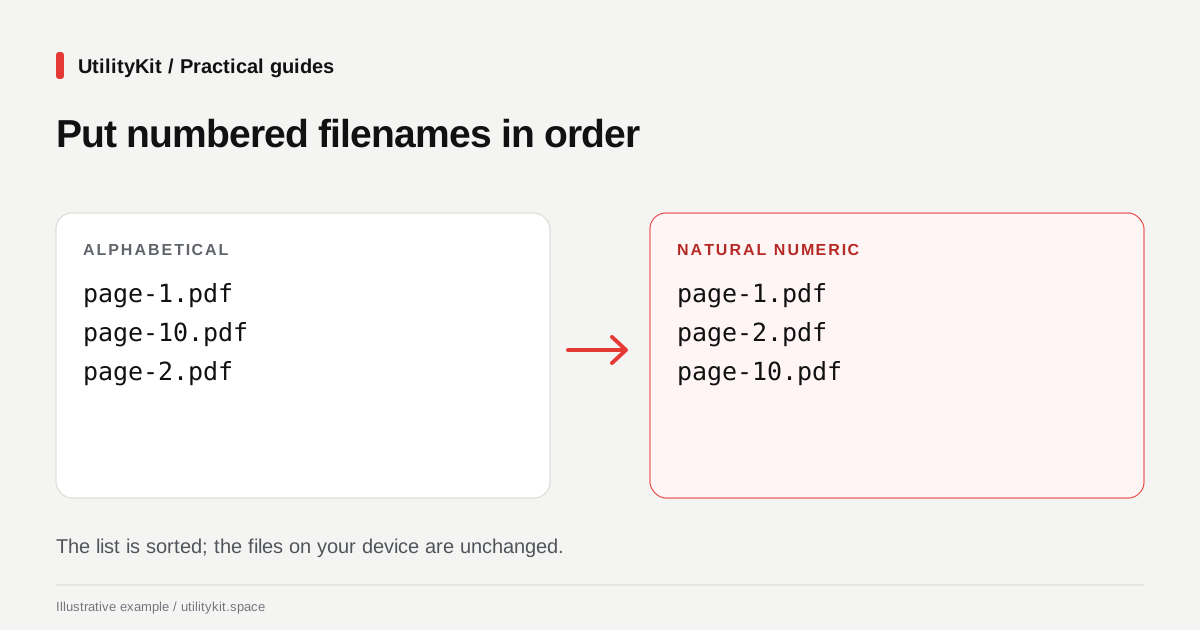
Select Natural Numeric (1, 2, 10) when a list contains labels such as page-1.pdf, page-2.pdf, and page-10.pdf. Natural sorting compares the number portions as numbers instead of treating every digit as an independent text character.
The free Sort and Number Lines tool applies this order to pasted filenames, chapter labels, or numbered task names without an account. It changes the list text, not the files on your device.
Organize the list without uploading the files
For an inventory of project documents, you can paste just the filenames and keep the actual files on your device. The list itself is sorted locally in the browser. Natural ordering, optional numbering, and custom prefixes or suffixes can then turn that inventory into a readable handoff checklist.
Sorting and copying the result are free. The combination of natural ordering and checklist formatting lets you prepare the list in one place. Website hosting and advertising still involve network requests; the privacy policy describes those separately.
See why alphabetical order can look wrong
Consider these filenames:
page-10.pdf
page-2.pdf
page-1.pdf
For these simple labels, alphabetical ordering puts page-10.pdf before page-2.pdf. Natural ordering produces:
page-1.pdf
page-2.pdf
page-10.pdfThis is useful when reviewing exports from a scanner or organizing a written inventory. It does not establish the correct reading sequence of a document whose filenames are already wrong.
Sort first, then add numbering
- Paste one item per line into Sort and Number Lines.
- Enable whitespace trimming if accidental spaces surround the items.
- Remove empty lines if they are not meaningful separators.
- Choose Natural Numeric (1, 2, 10).
- Inspect the result before enabling line numbers.
- If needed, choose a numbering style such as
1. Itemor01. Item (Padded).
For the three-file example, padded numbering produces:
01. page-1.pdf
02. page-2.pdf
03. page-10.pdf
The added numbers represent positions in the finished list. They do not replace the numbers inside the filenames. Remove pre-existing manual numbering before sorting if it would otherwise become the first thing the sorter compares.
Choose another mode when the order already means something
Use No Sorting (Preserve order) when a list is already in priority order and you only want to number it. Use Reverse Order to invert the current sequence, such as turning newest-first notes into oldest-first notes when their existing sequence is reliable.
Use A to Z (Alphabetical) for an ordinary word list where embedded numbers are not significant. Alphabetical behavior for accents and case can depend on the browser's locale. UtilityKit uses JavaScript's locale-aware comparison, documented in MDN's localeCompare reference.
Do not confuse natural sorting with data validation
Natural sorting is not a date parser, a spreadsheet row sorter, or a semantic-version comparator. A set of dates written partly as DD/MM/YYYY and partly as MM/DD/YYYY needs a consistent interpretation before any ordering is useful.
Likewise, a text file containing names in one column and associated amounts in another needs row-aware handling. Copying and sorting only the names can break the relationship with the amounts. Use a spreadsheet or structured-data workflow for that job.
Leading zeros deserve a check too. Identifiers such as item-02 and item-2 can compare similarly under numeric collation, but the tool does not make them identical or remove one. Review values whose formatting carries meaning.
Finish with a count and a spot check
Confirm the number of nonempty items, check the first and last few entries, and search for one item from the middle. If repeated entries are unwanted, use duplicate-line removal as a separate step so you can see how many were removed.
If the destination expects a single line, join the finished list with a separator after you have verified its order.
Last reviewed: October 28, 2026. File names are synthetic examples.
Frequently Asked Questions
Quick answers to common questions for users and search assistants
Does natural sorting rename the files on my computer?
Does sorting also remove duplicate lines?
Related Utilities Mentioned in This Guide
Browse directorySort and Number Lines
Sort lines alphabetically, numerically, or naturally, and add custom line numbering.
Duplicate Line Remover
Deduplicate lists, emails, keywords, and CSV rows with instant count metrics.
Join and Split Lines
Join lines with custom delimiters, or split text into lines by character or separator.
Continue Reading
Join Lines with Commas Free, Without Creating an Account
Turn a column into a comma-separated list free in your browser. Choose separators, keep meaningful blanks, and inspect the result without an account.
Remove Duplicate List Values Free in Your Browser
Remove repeated comma-separated values free, without an account. Process the list locally and control case, whitespace, and first-seen order.