JSON Objects, Arrays, and Value Types Explained with Real Examples
Master the 6 official JSON data types under RFC 8259: objects, arrays, strings, numbers, booleans, and null, and understand why undefined and functions are forbidden.
JSON Tools
Format, validate, view in a collapsible interactive tree, and visually edit JSON with draft safety.
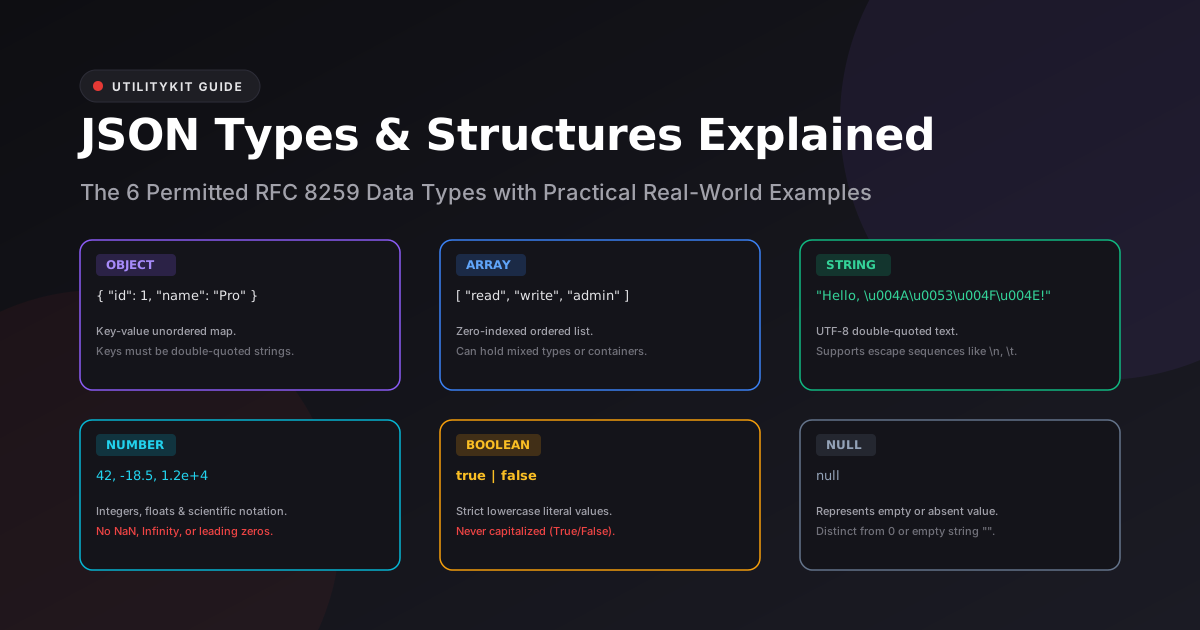
Despite powering almost the entire internet's API ecosystem, JSON is remarkably minimalist. Defined formally by RFC 8259, the JSON grammar permits exactly six data types.
While modern programming languages like TypeScript, Python, and Rust feature hundreds of rich types (enums, tuples, sets, maps, decimals, and dates), transferring data across the wire requires mapping everything into these six universal primitives.
In this guide, you will explore how each JSON data type works, inspect real-world examples, avoid common type conversion pitfalls, and learn how to inspect types visually.
The 6 Universal JSON Data Types
1. Object (`{}`)
An object is an unordered collection of zero or more key-value pairs wrapped in curly braces.
- Rule: Every key must be a string enclosed in double quotes (
"). - Rule: Keys must be separated from values by a colon (
:). - Rule: Key-value pairs must be separated by commas (
,).
{
  "user_id": 1092,
  "username": "alex_codes",
  "verified": true
}
2. Array (`[]`)
An array is an ordered sequence of zero or more values enclosed in square brackets.
- Rule: Elements are zero-indexed (
[0],[1],[2]). - Rule: Arrays can store mixed types, including nested objects and other arrays.
[
  "first",
  42,
  false,
  null,
  { "nested": "object" }
]
3. String (`""`)
A string is a sequence of zero or more Unicode characters wrapped in double quotes (").
- Rule: Single quotes (
') are strictly forbidden. - Rule: Special characters must be escaped with a backslash (e.g.,
\",\\,\n,\t).
{
  "title": "Senior Frontend Engineer",
  "quote": "Code is poetry, \"clean\" code is art.",
  "unicode_flag": "\u2600 Sun"
}
4. Number
JSON numbers can be integers, fractions, or exponential scientific notations.
- Rule: Numbers cannot have leading zeros (e.g.,
052is illegal; write52). - Rule:
NaN,Infinity, and-Infinityare strictly forbidden. - Rule: Hexadecimal literals (
0x1F) and octals are illegal.
{
  "integer": 42,
  "negative": -18,
  "decimal": 3.14159,
  "scientific": 1.25e+4
}
5. Boolean (`true` / `false`)
JSON booleans represent binary truth values.
- Rule: Must be lowercase literal
trueorfalse. - Rule: Capitalized
True,False, or string"true"are not boolean values.
{
  "is_admin": true,
  "email_verified": false
}
6. Null (`null`)
null represents an intentionally empty or non-existent value.
- Rule: Must be lowercase literal
null. - Rule: Distinct from
0,false, or an empty string"".
{
  "middle_name": null,
  "deleted_at": null
}
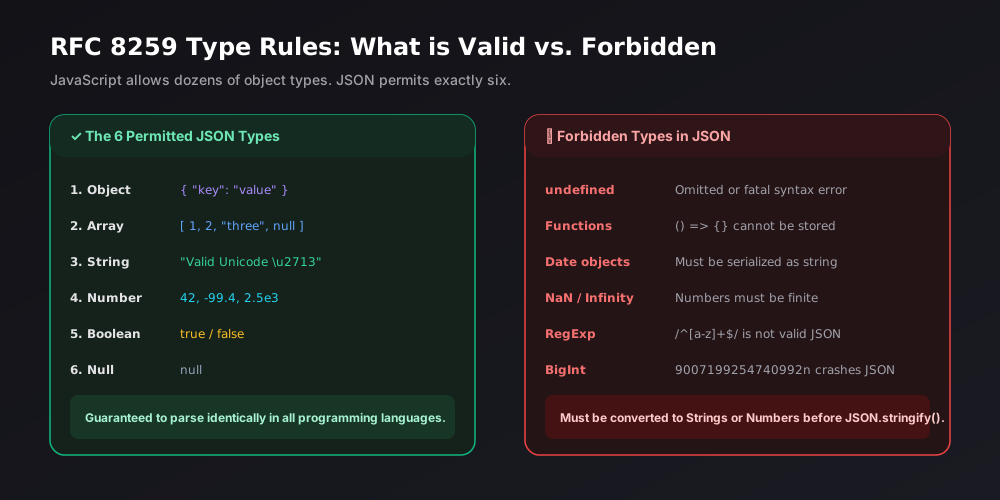
4 Things Developers Try to Put in JSON (That Fail!)
If you write full-stack JavaScript or Python, it is tempting to pass language features directly to JSON. Here is why they break:
| Invalid Type | Why It Fails | Safe Alternative |
undefined | Omitted by RFC 8259; triggers parse crashes. | Use null or omit the key entirely. |
Functions () => {} | Executable logic is strictly forbidden in data formats. | Send identifiers or parameters instead. |
Date objects | No native date type exists in JSON. | Serialize to ISO 8601 string: "2026-10-17T02:00:00Z". |
NaN / Infinity | JSON requires finite numeric values. | Use null or numerical flags. |
Inspecting Types Visually with UtilityKit
When inspecting a large JSON file, distinguishing between string numbers ("42" vs 42) or string booleans ("true" vs true) in raw text is tedious.
UtilityKit's JSON Tools highlights types automatically:
- Tree Viewer Mode: Badges each node as
STR,NUM,BOOL,NULL,OBJ, orARRwith dedicated color accents. - Visual Editor Mode: Provides a type selector dropdown next to every key, letting you convert types safely without breaking quotes or brackets.
Frequently Asked Questions
Quick answers to common questions for users and search assistants
Can a valid JSON file contain only a string or a number?
What happens to undefined or functions when serializing to JSON?
How does JSON represent dates and timestamps?
Related Utilities Mentioned in This Guide
Browse directoryJSON Tools
Format, validate, view in a collapsible interactive tree, and visually edit JSON with draft safety.
Text Diff Checker
Compare two text snippets side-by-side and highlight additions, deletions, and changes.
Text Cleaner
Remove rogue line breaks, extra spaces, odd characters, and formatting clutter.
Continue Reading
Escaping Quotes, Backslashes, and Unicode in JSON Strings
Master JSON string escape sequences under RFC 8259: handle Windows file paths, embedded quotation marks, control characters, and Unicode surrogate pairs without syntax errors.
How to Explore Deeply Nested JSON with a Collapsible Tree Viewer
Learn how to inspect, search, and navigate complex, multi-level JSON structures using an interactive collapsible tree viewer without text fatigue or accidental syntax edits.