Base64 Encoding vs Encryption: Why Obfuscation Is Not Security
Understand the mathematical difference between Base64 data representation and cryptographic encryption, how 6-bit grouping works, and how to encode safely.
Base64 Encoder & Decoder
Encode and decode Unicode text, UTF-8 strings, and files to and from Base64 format.
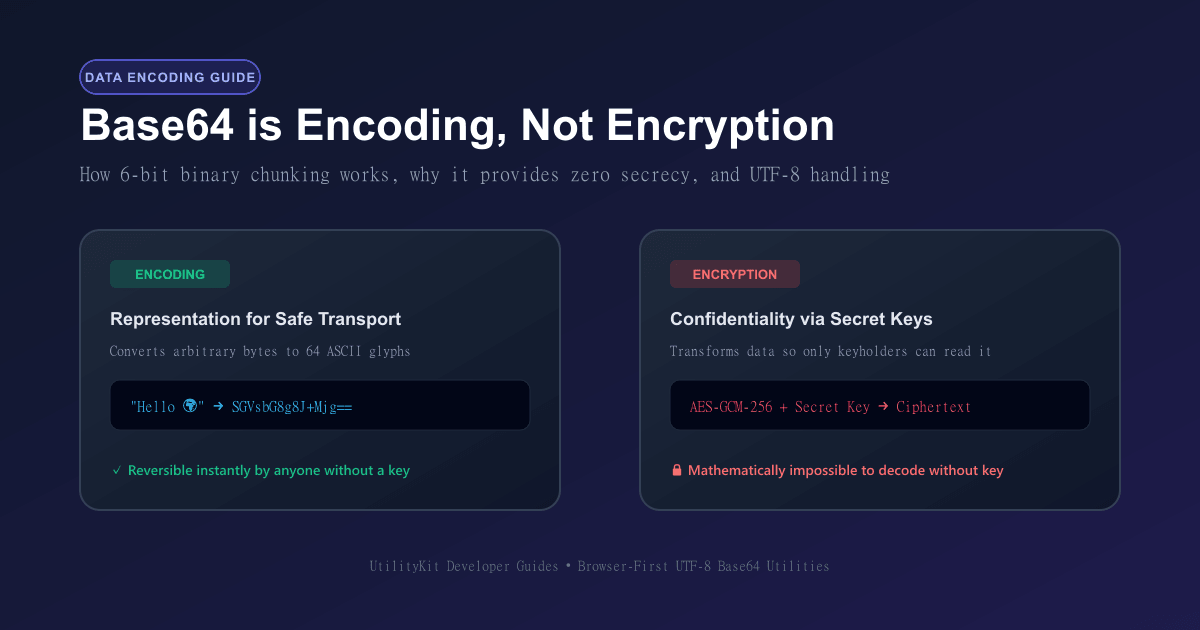
One of the most persistent misconceptions in web development and data security is confusing encoding with encryption. When junior engineers or API consumers see a string like SGVsbG8gV29ybGQh, it can look deceptively like a secret cipher or scrambled password.
However, treating Base64 as a security layer is a dangerous vulnerability. Base64 is encoding, not encryption. It provides zero confidentiality, zero integrity verification, and zero access control. Anyone who can inspect a Base64 string can decode it back to plain text or raw binary in a fraction of a millisecond.
In this deep dive, you will learn the exact mathematical mechanics behind Base64 grouping, why padding characters appear, the critical differences between transport encoding and cryptographic ciphers, and how to use the free Base64 Encoder/Decoder tool in your development workflow.
The Core Difference: Encoding vs Encryption vs Hashing
To design secure systems, developers must differentiate between three distinct data transformations:
- Encoding (e.g., Base64, Hex, ASCII, UTF-8): Converts data from one byte representation into another so it can be safely transmitted or stored across text-based protocols. The transformation is completely public, deterministic, and two-way. No secret key exists.
- Encryption (e.g., AES-256-GCM, RSA, ChaCha20): Scrambles data into unreadable ciphertext using a secret cryptographic key. It is two-way only for authorized parties who possess the corresponding secret key. Without the key, recovering the plaintext is computationally infeasible.
- Hashing (e.g., SHA-256, Argon2, bcrypt): A one-way mathematical digest that maps arbitrary data into a fixed-length fingerprint. Hashing cannot be decrypted or reversed by design, making it ideal for verifying password hashes and file integrity.
Critical Security Rule: Never store user passwords, API secrets, session tokens, or personal identifiers in raw Base64. Base64 is merely an open envelope, not a locked vault.
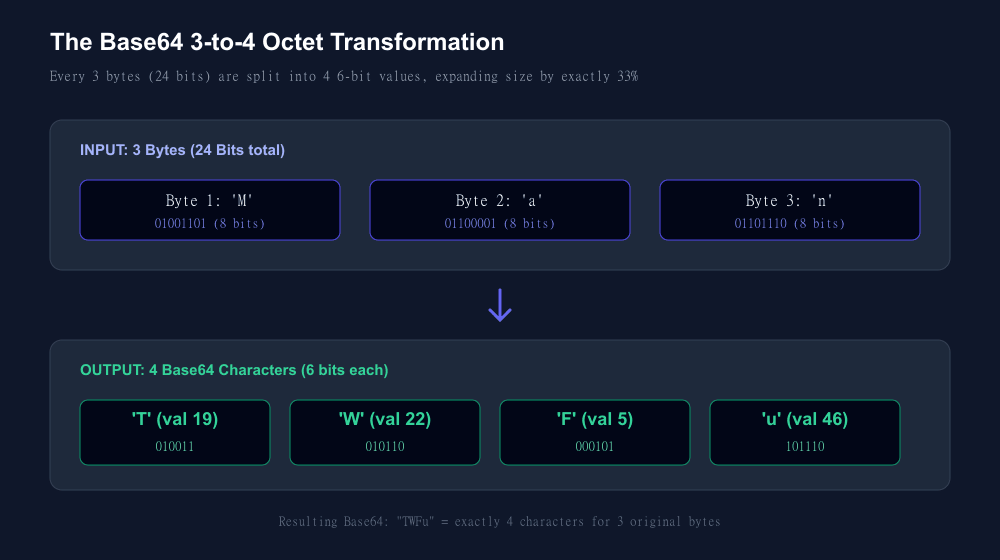
How Base64 Actually Works: The 24-Bit to 4-Character Mapping
The goal of Base64 is to take arbitrary 8-bit binary data (such as executable files, JPEG images, or compressed archives) and represent it entirely using 64 human-readable ASCII characters that will not be corrupted or misinterpreted by legacy email servers (MIME) or text parsers.
The standard Base64 character set consists of:
AtoZ(indices0to25): 26 uppercase lettersatoz(indices26to51): 26 lowercase letters0to9(indices52to61): 10 numeric digits+(index62) and/(index63): 2 special symbols
Because 2 to the power of 6 equals 64, each Base64 character can store exactly 6 bits of information. Meanwhile, standard computer memory represents data in 8-bit bytes.
To reconcile 8-bit bytes with 6-bit characters, Base64 finds the least common multiple: 3 bytes times 8 bits equals 24 bits, which equals 4 characters times 6 bits.
Step-by-Step Example: Encoding "Cat"
Let us trace how the ASCII string "Cat" is encoded into Base64:
- Determine ASCII byte values:
'C'=67(binary:01000011)'a'=97(binary:01100001)'t'=116(binary:01110100)
- Concatenate the 3 bytes into a single 24-bit stream:
01000011 01100001 01110100- Slice the 24 bits into four 6-bit chunks:
[010000] [110110] [000101] [110100]- Convert each 6-bit chunk to its decimal value:
010000= 16110110= 32 + 16 + 4 + 2 = 54000101= 4 + 1 = 5110100= 32 + 16 + 4 = 52
- Look up each decimal index in the Base64 alphabet table:
- Index 16 maps to
'Q' - Index 54 maps to
'2' - Index 5 maps to
'F' - Index 52 maps to
'0'
The final Base64 result for "Cat" is `Q2F0`.
Because 3 raw bytes expand into 4 ASCII characters, Base64 encoding always increases data size by approximately 33.3% (4/3).
Why Do Some Base64 Strings End With `=`? Understanding Padding
What happens when your input string is not an exact multiple of 3 bytes?
- If you have 1 byte left over (8 bits):
You need 16 bits to form a multiple of 6. The algorithm takes the 8 bits, appends 4 zero bits to form two 6-bit chunks (12 bits), and pads the remaining two 6-bit positions with two equals signs (==).
- If you have 2 bytes left over (16 bits):
The algorithm takes the 16 bits, appends 2 zero bits to form three 6-bit chunks (18 bits), and pads the remaining one 6-bit position with a single equals sign (=).
For instance:
"M"(1 byte) encodes as"TQ=="(2 characters + 2 padding symbols)."Ma"(2 bytes) encodes as"TWE="(3 characters + 1 padding symbol)."Man"(3 bytes) encodes as"TWFu"(4 characters + 0 padding symbols).
URL-Safe Base64: Avoiding URI Breakage
Standard Base64 contains two characters that cause severe issues when embedded in Web URLs or REST query parameters: + (which many web servers decode as a space character) and / (which browsers interpret as a URL path separator).
To solve this, RFC 4648 Section 5 defines URL-safe Base64:
- The plus sign
+is replaced with hyphen-. - The forward slash
/is replaced with underscore_. - Padding equals signs (
=) are typically stripped, as web endpoints can calculate required padding from string length alone.
When creating JWTs (JSON Web Tokens) or cloud download tokens, URL-safe Base64 is the universal industry standard.
Practical Examples Across Languages
JavaScript / TypeScript (Browser & Node.js)
// Standard Browser Encoding (UTF-8 safe)
function utf8ToBase64(str: string): string {
  const bytes = new TextEncoder().encode(str);
  const binString = Array.from(bytes, (byte) => String.fromCharCode(byte)).join("");
  return btoa(binString);
}

// Decoding Base64 back to UTF-8
function base64ToUtf8(base64: string): string {
  const binString = atob(base64);
  const bytes = Uint8Array.from(binString, (m) => m.charCodeAt(0));
  return new TextDecoder().decode(bytes);
}

console.log(utf8ToBase64("Hello, UtilityKit!"));
// "SGVsbG8sIFV0aWxpdHlLaXQh"
Python 3
import base64

raw_text = "Secure API Payload"
encoded_bytes = base64.b64encode(raw_text.encode('utf-8'))
print(encoded_bytes.decode('ascii'))
# Output: U2VjdXJlIEFQSSBQYXlsb2Fk

# URL-Safe encoding
url_safe = base64.urlsafe_b64encode(raw_text.encode('utf-8')).decode('ascii').rstrip('=')
print(url_safe)
Try It Now in Your Browser
Whenever you need to inspect an encoded JWT segment, embed an image data URI, or debug webhook payloads, avoid sending sensitive data to random third-party ad-heavy web pages.
Use the free, private Base64 Encoder/Decoder on UtilityKit. All transformations run completely on your client machine with zero server roundtrips, ensuring your credentials and code snippets remain private.
Frequently Asked Questions
Quick answers to common questions for users and search assistants
Is Base64 an encryption algorithm?
Why do some Base64 strings end with one or two equals signs (=)?
What is URL-safe Base64 encoding?
Related Utilities Mentioned in This Guide
Browse directoryBase64 Encoder & Decoder
Encode and decode Unicode text, UTF-8 strings, and files to and from Base64 format.
Password Generator
Generate strong, unbiased random passwords with customizable length and character sets.
UUID v4 Generator
Generate cryptographically random RFC 4122 Version 4 UUIDs individually or in bulk.
Continue Reading
How Password Entropy and Modulo Bias Affect Password Security
Learn the mathematics of password entropy, why passphrase length beats complex symbols, and how modulo bias undermines random generators.
QR Code Error Correction and Payload Formats Explained
Learn how Reed-Solomon error correction keeps damaged QR codes readable, how to format Wi-Fi, vCard, and URL payloads, and scan-reliability rules.